
AI Prompts for Teachers: 7 Practical Prompts
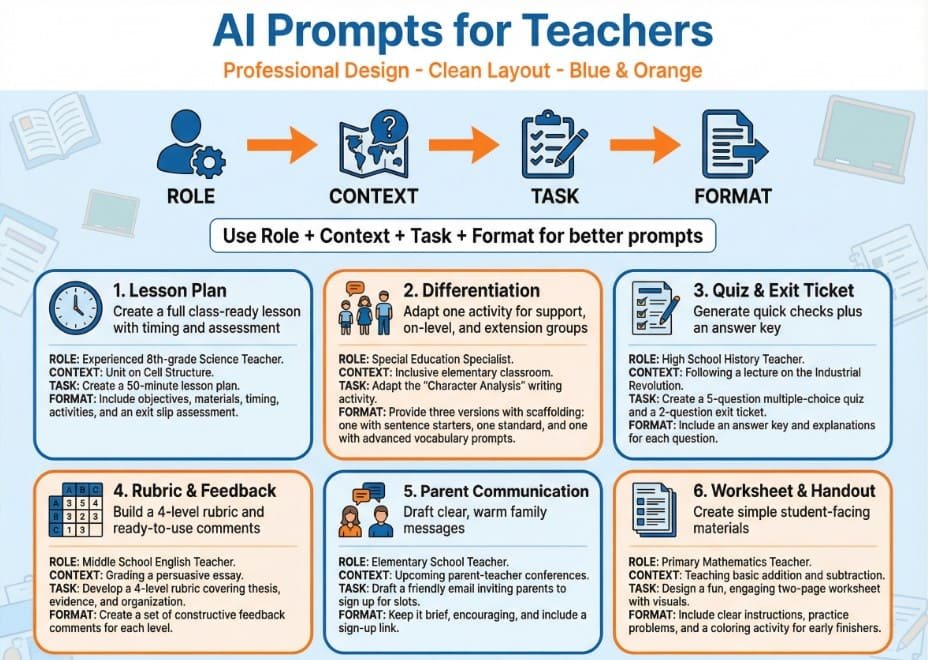
AI can help teachers plan lessons, adjust materials, write feedback, and communicate faster. But the quality of the result depends on the quality of the prompt. Clear prompts work better because they give the AI a role, context, a task, and a format. Specific details also lead to better classroom-ready outputs.
The best way to use AI in teaching is simple: treat it like a fast assistant, not like the final decision-maker. Always check accuracy, tone, and age-appropriateness before using anything with students or families. Human review matters, especially in education.
How to get better results from any prompt
Before you paste a prompt, add these details:
- grade level
- subject
- topic
- lesson length
- student needs
- output format
- tone
- what to include
- what to avoid
This makes the response more useful and reduces editing time.
The 7 Best AI Prompts for Teachers
| # | Prompt type | Best for | What you get |
|---|---|---|---|
| 1 | Lesson plan prompt | Daily planning | A full lesson with objective, steps, timing, and assessment |
| 2 | Differentiation prompt | Mixed-ability classes | Adjusted tasks for support, on-level, and extension |
| 3 | Quiz and exit ticket prompt | Quick assessment | Questions, answer key, and short checks for understanding |
| 4 | Feedback and rubric prompt | Faster marking | Clear rubric language and student-friendly feedback |
| 5 | Parent communication prompt | Emails and messages | Warm, simple messages for families |
| 6 | Worksheet and handout prompt | Student-facing materials | Ready-to-use practice sheets and guided tasks |
| 7 | Substitute plan prompt | Emergency absence or sub day | A clear sub plan with timing, directions, and notes |
1) The lesson plan prompt
Use this when you need a lesson fast but still want structure.
Prompt:
Act as an experienced teacher. Create a complete lesson plan for a [grade level] [subject] class on [topic]. The lesson should last [time]. Include: learning objective, warm-up, direct instruction, guided practice, independent practice, differentiation ideas, materials needed, and an exit ticket. Write it in simple classroom-ready language. Keep it realistic for one class period.
Why it works:
It gives the AI a role, a task, a time limit, and a clear output format. That usually leads to a cleaner result with less rewriting. Source
Example use:
A 7th grade science lesson on ecosystems for 45 minutes.
2) The differentiation prompt
Use this when one lesson needs to work for different learners.
Prompt:
Take this lesson/activity and adapt it for three groups: 1) students who need extra support, 2) on-level students, and 3) students who need extension. Keep the same learning goal. Include specific changes to instructions, task difficulty, scaffolds, and expected output. Make the adaptations realistic for a regular classroom.
Why it works:
Instead of asking for “different versions,” it asks for clear categories and concrete changes. That makes the result easier to use right away.
Tip:
Paste your original task under the prompt so the AI has enough context.
3) The quiz and exit ticket prompt
Use this when you want a fast check for understanding.
Prompt:
Create a short assessment for a [grade level] [subject] lesson on [topic]. Include 5 multiple-choice questions, 3 short-answer questions, and 1 exit ticket. Add an answer key and mark which questions test basic understanding and which test deeper thinking. Keep the language age-appropriate.
Why it works:
It tells the AI exactly how many questions to make and what kind. It also asks for an answer key, which saves time.
Best use cases:
- end of lesson checks
- homework review
- reteach groups
- bell ringers for the next day
4) The rubric and feedback prompt
Use this when grading takes too long.
Prompt:
Create a simple rubric for a [grade level] assignment on [task/topic]. Use 4 performance levels. Keep the criteria clear and student-friendly. Then write 10 ready-to-use feedback comments: 5 positive comments, 3 growth comments, and 2 next-step comments. Make the feedback specific but short.
Why it works:
You get both the grading tool and the comments in one go.
Extra tip:
Ask for comments in your own tone, such as “warm and encouraging” or “direct and professional.”
5) The parent communication prompt
Use this when you need to write faster and sound clear.
Prompt:
Write a short message to a parent or caregiver about [topic]. The tone should be warm, respectful, and easy to understand. Avoid school jargon. Keep it under [word count]. Include: the reason for the message, what the student is doing well, what support is needed, and one clear next step.
Why it works:
It helps the AI stay calm, kind, and practical. It also reduces the chance of getting a long, formal message that sounds robotic.
Best use cases:
- behavior updates
- missing work
- praise messages
- field trip reminders
- conference follow-up
6) The worksheet and handout prompt
Use this when students need something clear and independent.
Prompt:
Create a student-facing worksheet for a [grade level] class on [topic]. Include clear directions, one model example, guided practice, independent practice, and a short reflection question. Write everything in simple language so students can work with minimal teacher support. Format it with clear headings.
Why it works:
Student-facing materials need simple wording and strong structure. This prompt asks for both.
Important:
Always read it before printing. AI can sometimes make examples too easy, too hard, or slightly off-topic. Careful review is especially important for materials students will use independently. Source
7) The substitute plan prompt
Use this when you are out and need something clear for another adult to run.
Prompt:
Turn this lesson into a full substitute teacher plan for a [grade level] [subject] class. Break it into clear time blocks. Include what students should do, what the substitute should say or monitor, materials needed, behavior expectations, and what to do if time runs short. Also add a short note with classroom routines and helpful reminders.
Why it works:
A sub plan needs more than a lesson outline. It needs timing, directions, transitions, and routines. Specific prompts produce better sub plans than vague ones.
A simple formula teachers can reuse
If you do not know how to start, use this template:
Act as a [role]. Create a [output type] for a [grade level] [subject] class about [topic]. The goal is [learning goal]. Include [must-have items]. Keep the tone [tone]. Format the response as [format]. Do not include [things to avoid].
This basic structure works for almost everything: plans, emails, quizzes, rubrics, worksheets, and summaries.
Mini Infographic: The Teacher Prompt Formula
CopyAI PROMPT FORMULA FOR TEACHERS

1. ROLE
   "Act as an experienced middle school English teacher"

        ↓

2. CONTEXT
   Grade level + subject + topic + time + student needs

        ↓

3. TASK
   "Create a lesson / quiz / worksheet / email / rubric"

        ↓

4. CONSTRAINTS
   Word count, tone, difficulty, must include, must avoid

        ↓

5. FORMAT
   Table, bullet points, step-by-step, printable handout

        ↓

6. CHECK
   Review facts, tone, level, bias, and clarity before use
Common mistakes teachers should avoid
Being too vague
If you write “make a worksheet,” the result may be generic. If you write “make a printable worksheet for 5th grade fractions with one worked example and 8 practice problems,” the result is usually much better.
Not giving the format
If you want a table, checklist, email, or rubric, say so.
Not checking the result
AI can sound confident even when it is wrong. Always review before using it with students or families.
Trying to do too much in one prompt
It is often better to do this in two steps: first create the lesson, then adapt it, then turn it into a worksheet.
FAQ
1) What is the best prompt structure for teachers?
A strong prompt usually includes four things: role, context, task, and format. If needed, also add tone, length, and things to avoid.
2) Can teachers use AI for grading?
AI can help draft rubrics, sample feedback, and comment banks. But final grading decisions should stay with the teacher.
3) How do I make AI responses less generic?
Add details. Include the grade, subject, lesson goal, time limit, and output format. Specific prompts produce stronger results.
4) Is it okay to use AI for parent emails?
Yes, for drafting. But check tone, facts, and privacy before sending. Keep personal student information limited and review every message yourself.
5) What should teachers never copy from AI without checking?
Anything student-facing, family-facing, or grade-related. Always review for accuracy, tone, bias, and age level.
6) Which prompt should I start with first?
Start with the lesson plan prompt or the parent communication prompt. They usually save the most time right away.
Final thought
The best AI prompts for teachers are not fancy. They are clear, specific, and practical. If you tell the AI who it is, what you teach, what you need, and how the answer should look, you will usually get something useful in seconds. Then your job is simple: review, adjust, and use what helps.