

AI Prompts for Sales: 7 Real Examples for Outreach, Calls, and Closing Deals
AI is most useful in sales when it helps with work you already do every day: researching accounts, writing outreach, preparing for calls, handling objections, and sending follow-ups faster. That matches how sales teams are using AI in practice for research, emails, scripts, training, and workflow support.
The key is not to ask AI vague questions. Good prompts are specific. They give context, define the task, and ask for a clear output. That is also the basic advice for better prompt writing: be precise, provide context, and refine the result if needed.
Below are 7 practical prompts for sales. They are simple, easy to adapt, and built for real use.
Quick summary
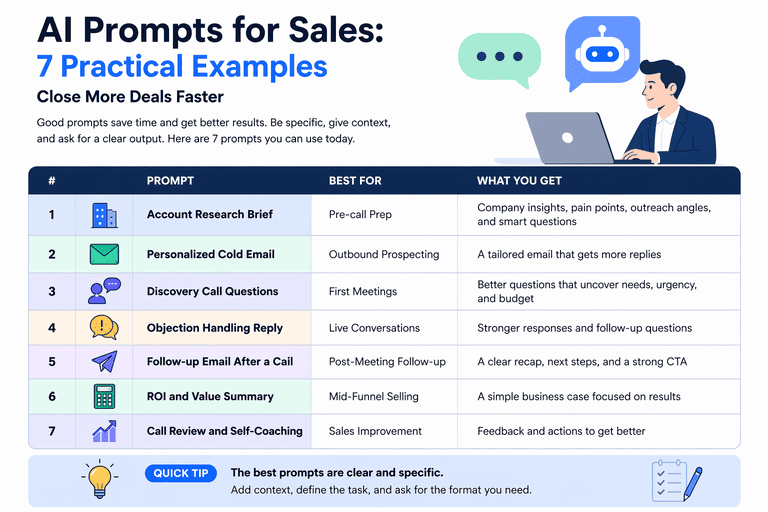
| # | Prompt | Best for | What you get |
|---|---|---|---|
| 1 | Account research brief | Pre-call prep | A short summary of the company, pain points, and angles |
| 2 | Personalized cold email | Outbound prospecting | A tailored email that sounds relevant |
| 3 | Discovery call questions | First meetings | Smart questions based on the buyer and context |
| 4 | Objection handling reply | Live sales conversations | Better responses to common pushback |
| 5 | Follow-up email after a call | Post-meeting follow-up | A clear recap with next steps |
| 6 | ROI and value summary | Mid-funnel selling | A simple business case tied to outcomes |
| 7 | Call review and self-coaching | Sales improvement | Feedback on what to improve next time |
1) Prompt for account research before outreach
When to use it: before a first email, cold call, or discovery meeting.
CopyYou are a sales research assistant.

I am selling [your product] to [target buyer role] at [company name].

Using the context below, create a short account research brief.

Include:
1. What this company likely cares about right now
2. 3 possible business pain points for this buyer
3. 3 reasons my product may be relevant
4. 2 outreach angles I can test
5. 5 smart discovery questions

My product:
[short description]
Target buyer:
[job title]
Company context:
[paste website copy, LinkedIn summary, recent news, notes, or call prep material]
Output format: – 5 bullet summary – pain points table – 2 outreach angles – 5 discovery questions
Why it works:
Sales teams already use AI for research and call preparation. A prompt like this saves time and gives you a usable brief instead of random notes.
2) Prompt for a personalized cold email
When to use it: when you want outbound emails to sound relevant, not generic.
CopyYou are a B2B sales rep writing a cold email.

Write a short cold email to [name], who is a [job title] at [company].

Goal:
Book a 20-minute meeting.

Use this context:
- My product: [what you sell]
- Target problem: [problem you solve]
- Why this company may care: [reason]
- Proof point: [customer example, result, or case study]
- CTA: [your CTA]

Rules:
- Keep it under 120 words
- Make it sound natural, not pushy
- No hype
- No buzzwords
- Mention one specific reason this message is relevant
- Give me 3 subject line options

Output:
1. Subject lines
2. Email version A
3. Email version B with a different angle
Why it works:
Creating sales emails is one of the clearest time-saving uses of generative AI. The prompt works because it gives the model the exact buyer, offer, relevance, and CTA. Salesforce
3) Prompt for better discovery call questions
When to use it: before a first call or when you want sharper discovery.
CopyYou are an experienced sales discovery coach.

Help me prepare for a discovery call with:
- Buyer role: [job title]
- Company type: [industry, size, business model]
- My product: [short description]
- Likely challenge: [problem they may have]

Create:
1. 10 discovery questions
2. 5 follow-up questions
3. 3 questions that uncover urgency
4. 3 questions that uncover decision process
5. 3 questions that uncover budget or business impact

Rules:
- Questions should sound natural
- Keep them short
- Avoid leading questions
- Focus on business pain, current process, and desired outcome

Output format:
Group the questions by category.
Why it works:
AI is useful for scripts and call prep, but only if the prompt is clear. This one helps you go into calls with better questions, not just a generic talk track.
4) Prompt for handling objections
When to use it: when deals stall because of price, timing, risk, or a competitor.
CopyYou are a sales coach.

Help me respond to this sales objection:
"[paste objection]"

Context:
- My product: [what you sell]
- Buyer role: [job title]
- Industry: [industry]
- Main value: [core value]
- Competitor or current alternative: [if relevant]

Create:
1. A short direct response
2. A softer consultative response
3. 3 follow-up questions to understand the real concern
4. 1 example story or analogy to explain the value clearly
5. What mistake I should avoid when answering this objection

Tone:
Calm, confident, and helpful.
Do not sound defensive.

Output format:
- Short response
- Consultative response
- Follow-up questions
- Coaching note
Why it works:
Objection handling is a common AI use case in sales, especially when you want to practice responses or improve your wording. Asking for both a response and follow-up questions is important because the first objection is often not the real issue.
5) Prompt for a follow-up email after a sales call
When to use it: right after a discovery call, demo, or pricing conversation.
CopyYou are a sales rep writing a follow-up email after a call.

Write a follow-up email based on these notes:
[insert notes]
Include: 1. A short thank-you 2. The buyer’s top priorities or pain points 3. The value points most relevant to them 4. Agreed next steps 5. Any open questions 6. A clear CTA Rules: – Keep it under 150 words – Make it easy to skim – Use plain language – No generic filler Create: – one version for a warm prospect – one version for a deal that feels at risk
Why it works:
Meeting summaries and follow-up drafts are one of the easiest ways AI can save time in sales. This prompt gives structure to your notes and turns them into a clean message fast.
6) Prompt for an ROI and value summary
When to use it: when the buyer asks, “What is the business case?” or “Why should we do this now?”
CopyYou are a sales strategist.

Help me create a simple ROI and value summary for a prospect.

Prospect:
[company name, buyer role, industry]
My product:
[short description]
Current problem:
[what is happening now]
Potential impact:
[time saved, revenue gained, risk reduced, cost avoided, etc.]
Create: 1. A simple value summary in plain English 2. 3 business outcomes this buyer may care about 3. A before vs. after table 4. A short message I can say on a call 5. A short version I can paste into an email Rules: – Keep it simple – Do not invent hard numbers unless I provide them – If assumptions are needed, label them clearly
Why it works:
Sales is not just about features. It is about outcomes. This prompt helps you move from product description to business value, which matters more in later-stage deals.
7) Prompt for reviewing a sales call and coaching yourself
When to use it: after a call when you want to improve fast.
CopyYou are a sales coach reviewing my call.

Below is my call transcript or notes:
[paste transcript or notes]
Review it and tell me: 1. What I did well 2. Where I lost momentum 3. Which questions were strong 4. Which questions were weak or too early 5. What objections I missed 6. What buying signals appeared 7. What I should do differently in the next call Then create: – 3 coaching points – a better version of 3 things I said – 5 next-call questions Tone: Direct, useful, and honest.
Why it works:
AI is also useful for training and coaching, not just writing. A review prompt like this helps reps improve faster because it gives feedback tied to real conversations.
What makes these prompts work
The strongest sales prompts usually have five parts:
- Role — who the AI should act like: rep, coach, researcher, strategist
- Context — product, buyer, company, and deal stage
- Task — what you need it to do
- Rules — tone, word count, what to avoid
- Output format — email, bullets, table, script, or questions
That structure makes the output better and faster. It also reduces the chance of getting generic answers.
A simple template you can reuse
If you want one format that works for almost any sales task, use this:
CopyYou are [role].

Context:
[product, buyer, company, stage, problem]
Task:
[what you want the AI to do]
Rules:
[tone, word limit, what to include, what to avoid]
Output format:
[email / bullets / table / script / questions]
If information is missing, do not guess. Tell me what is missing.
Final takeaway
The best AI prompts for sales are not clever. They are clear. They help you do the work faster: research accounts, write better emails, prepare for calls, handle objections, follow up well, and improve your conversations over time. That is where AI brings real value to sales teams today.